C++ Tutorials
This section provides C++ tutorials covering core DXRT SDK features, including synchronous/asynchronous inference, batch processing, and runtime configuration. The examples help developers quickly integrate DXRT into real-time and embedded applications.
Run (Synchronous)
The synchronous Run method uses a single NPU core to perform inference in a blocking manner. It can be configured to utilize multiple NPU cores simultaneously by employing threads to run each core independently.
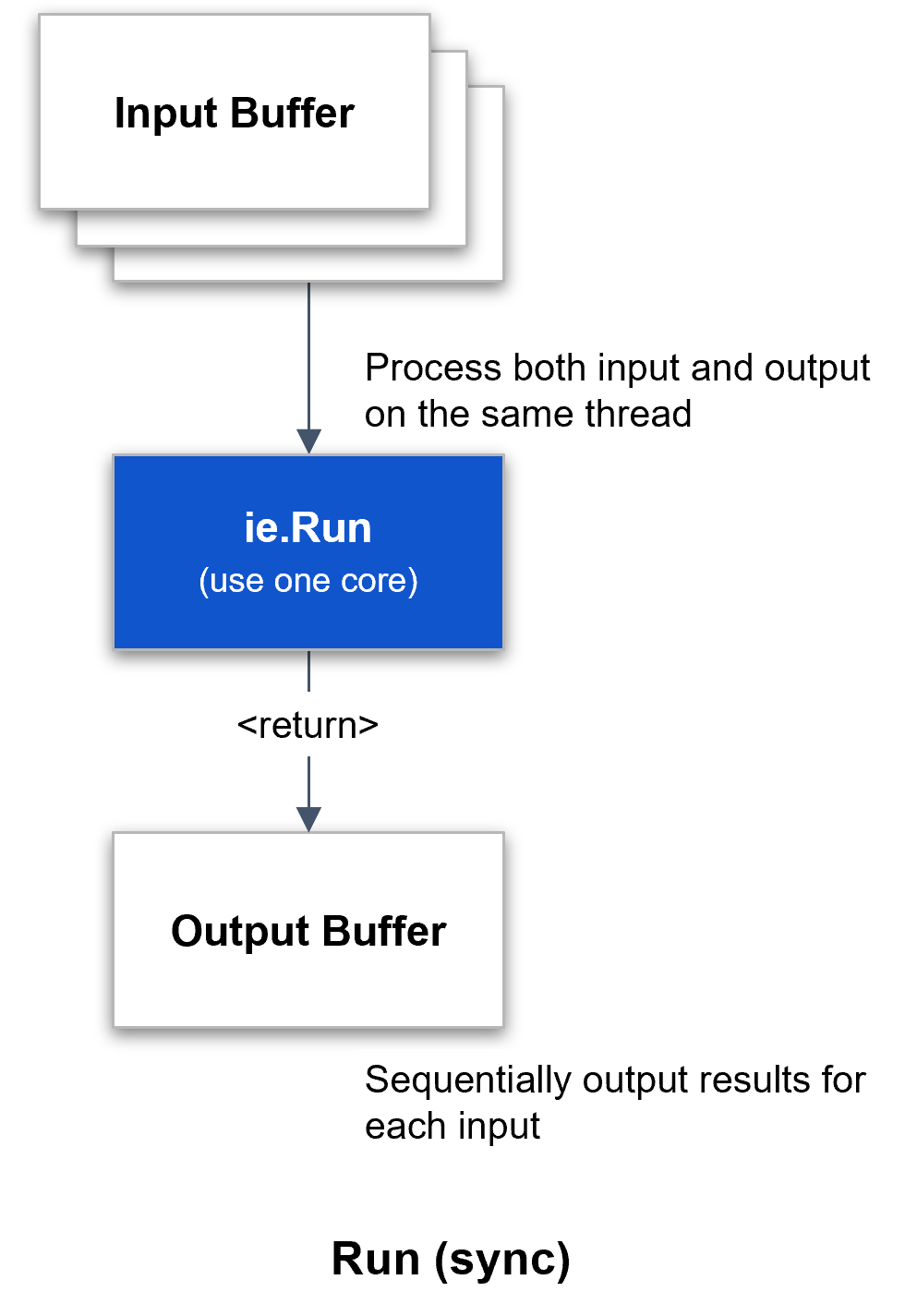
Figure. Synchronous Inference Operation
Inference Engine Run synchronous
- Inference synchronously
- Use only one npu core
The following is the simplest example of synchronous inference.
run_sync_model.cpp
// DX-RT includes
#include <dxrt/dxrt_cxx_api.h>
...

int main()
{
    std::string modelPath = "model-path";

    try
    {
        // create inference engine instance with model
        dxrt::InferenceEngine ie(modelPath);

        // create temporary input buffer for example
        std::vector<uint8_t> inputPtr(ie.GetInputSize(), 0);

        // inference loop
        for(int i = 0; i < 100; ++i)
        {
            // inference synchronously
            // use only one npu core
            auto outputs = ie.Run(inputPtr.data());

            // post processing
            postProcessing(outputs);

        } // for i
    }
    catch(const dxrt::Exception& e)  // exception for inference engine
    {
        std::cerr << e.what() << " error-code=" << e.code() << std::endl;
        return -1;
    }
    catch(const std::exception& e)
    {
        std::cerr << e.what() << std::endl;
        return -1;
    }

    return 0;
}
RunAsync (Asynchronous)
The asynchronous Run mode is a method that performs inference asynchronously while utilizing multiple NPU cores simultaneously. It can be implemented to maximize NPU resources through a callback function or a thread wait mechanism.
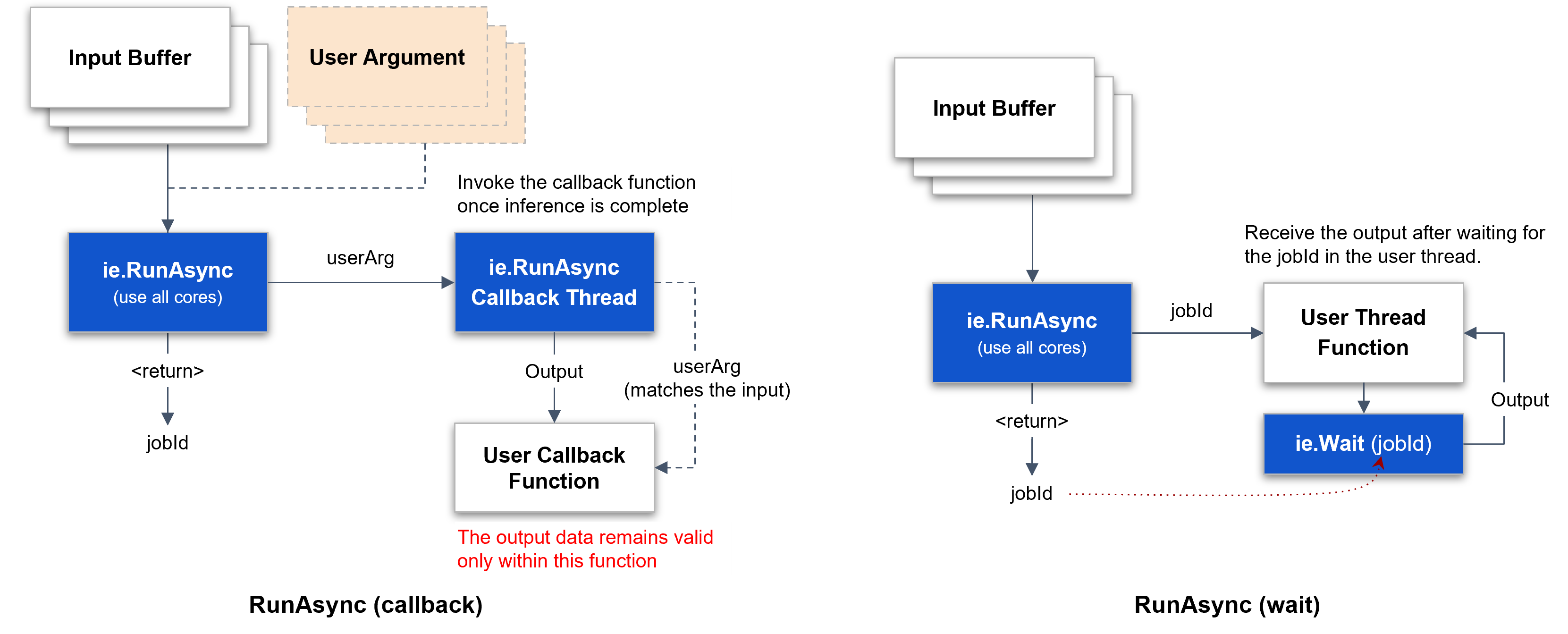
Figure. Asynchronous Inference Operation
Inference Engine RunAsync, Callback, User Argument
- the outputs are guaranteed to be valid only within this callback function
- processing this callback functions as quickly as possible is beneficial for improving inference performance
- inference asynchronously, use all npu cores
- if
device-load >= max-load-value, this function will block
The following is an example of asynchronous inference using a callback function. A user argument can be used to synchronize the input with the output of the callback.
run_async_model.cpp
// DX-RT includes
#include <dxrt/dxrt_cxx_api.h>
...

int main(int argc, char* argv[])
{
    ...

    int callback_count = 0;

    try
    {

        std::mutex cv_mutex;
        std::condition_variable cv;

        // create inference engine instance with model
        dxrt::InferenceEngine ie(model_path);

        // register call back function
        ie.RegisterCallback([&callback_count, &loop_count, &cv_mutex, &cv]
            (dxrt::TensorPtrs &outputs, void *userArg) {

            std::ignore = outputs;
            std::ignore = userArg;

            std::unique_lock<std::mutex> lock(cv_mutex);
            callback_count++;
            if ( callback_count == loop_count ) cv.notify_one();

            return 0;
        });

        // create temporary input buffer for example
        std::vector<uint8_t> inputPtr(ie.GetInputSize(), 0);

        auto start = std::chrono::high_resolution_clock::now();

        // inference loop
        for(int i = 0; i < loop_count; ++i)
        {
            // user argument
            std::pair<int, int> *userData = new std::pair<int, int>(i, loop_count);

            // inference asynchronously, use all npu cores
            ie.RunAsync(inputPtr.data(), userData);

            log.Debug("Inference request submitted with user_arg(" + std::to_string(i) + ")");
        }

        // wait until all callbacks have been processed
        std::unique_lock<std::mutex> lock(cv_mutex);
        cv.wait(lock, [&callback_count, &loop_count] {
            return callback_count == loop_count;
        });

        ...

    }
    catch (const dxrt::Exception& e)
    {
        ...
        return -1;
    }
    catch (const std::exception& e)
    {
        ...
        return -1;
    }
    catch(...)
    {
        ...
        return -1;
    }

    return (callback_count == loop_count ? 0 : -1);
}
The following is an example where multiple threads start input and inference, and a single callback processes the output.
Inference Engine RunAsync, Callback, User Argument, Thread
- the outputs are guaranteed to be valid only within this callback function
- processing this callback functions as quickly as possible is beneficial for improving inference performance
- inference asynchronously, use all npu cores
- if
device-load >= max-load-value, this function will block
run_async_model_thread.cpp
// DX-RT includes
#include <dxrt/dxrt_cxx_api.h>
...

static const int THREAD_COUNT = 3;
static std::atomic<int> gResultCount = {0};
static std::atomic<int> gTotalCount = {0};
static ConcurrentQueue<int> gResultQueue(1);
static std::mutex gCBMutex;

static int inferenceThreadFunc(dxrt::InferenceEngine& ie, std::vector<uint8_t>& inputPtr, int threadIndex, int loopCount)
{

    // inference loop
    for(int i = 0; i < loopCount; ++i)
    {
        // user argument
        UserData *userData = new UserData();

        // thread index
        userData->setThreadIndex(threadIndex);

        // total loop count
        userData->setLoopCount(loopCount);

        // loop index
        userData->setLoopIndex(i);

        try
        {
            // inference asynchronously, use all npu cores
            // if device-load >= max-load-value, this function will block
            ie.RunAsync(inputPtr.data(), userData);
        }
        catch(const dxrt::Exception& e)
        {
            std::cerr << e.what() << " error-code=" << e.code() << std::endl;
            std::exit(-1);
        }
        catch(const std::exception& e)
        {
            std::cerr << e.what() << std::endl;
            std::exit(-1);
        }

    } // for i

    return 0;

}

// invoke this function asynchronously after the inference is completed
static int onInferenceCallbackFunc(dxrt::TensorPtrs &outputs, void *userArg)
{

    // the outputs are guaranteed to be valid only within this callback function
    // processing this callback functions as quickly as possible is beneficial
    // for improving inference performance

    // user data type casting
    UserData *user_data = reinterpret_cast<UserData*>(userArg);

    // thread index
    int thread_index = user_data->getThreadIndex();

    // loop index
    int loop_index = user_data->getLoopIndex();

    // post processing
    // transfer outputs to the target thread by thread_index
    // postProcessing(outputs, thread_index);
    (void)outputs;


    // result count
    {
        // Mutex locks should be properly adjusted
        // to ensure that callback functions are thread-safe.
        std::lock_guard<std::mutex> lock(gCBMutex);

        gResultCount++;
        if ( gResultCount.load() == gTotalCount.load() ) gResultQueue.push(0);
    }

    // delete argument object
    delete user_data;

    return 0;
}


int main(int argc, char* argv[])
{
    ...

    bool result = false;

    try
    {
        // create inference engine instance with model
        dxrt::InferenceEngine ie(modelPath);

        // register call back function
        ie.RegisterCallback(onInferenceCallbackFunc);

        // create temporary input buffer for example
        std::vector<uint8_t> inputPtr(ie.GetInputSize(), 0);

        gTotalCount.store(loop_count * THREAD_COUNT);

        // thread vector
        std::vector<std::thread> thread_array;

        for(int i = 0; i < THREAD_COUNT; ++i)
        {
            // create thread
            thread_array.push_back(std::thread(inferenceThreadFunc, std::ref(ie), std::ref(inputPtr), i, loop_count));
        }

        for(auto &t : thread_array)
        {
            t.join();
        } // for t


        // wait until all callbacks have been processed
        gResultQueue.pop();

    }
    catch (const dxrt::Exception& e)
    {
        std::cerr << e.what() << " error-code=" << e.code() << std::endl;
        return -1;
    }
    catch (const std::exception& e)
    {
        std::cerr << e.what() << std::endl;
        return -1;
    }
    catch(...)
    {
        std::cerr << "Exception" << std::endl;
        return -1;
    }

    return result ? 0 : -1;
}
The following is an example of performing asynchronous inference by creating an inference wait thread. The main thread starts input and inference, and the inference wait thread retrieves the output data corresponding to the input.
Inference Engine RunAsync, Wait
- inference asynchronously, use all npu cores
- if
device-load >= max-load-value, this function will block
run_async_model_wait.cpp
// DX-RT includes
#include <dxrt/dxrt_cxx_api.h>
...

// concurrent queue is a thread-safe queue data structure
// designed to be used in a multi-threaded environment
static ConcurrentQueue<int> gJobIdQueue;

// user thread to wait for the completion of inference
static int inferenceThreadFunc(dxrt::InferenceEngine& ie, int loopCount)
{
    int count = 0;

    while(...)
    {
        // pop item from queue
        int jobId = gJobIdQueue.pop();

        try
        {
            // waiting for the inference to complete by jobId
            auto outputs = ie.Wait(jobId);

            // post processing
            postProcessing(outputs);

        }
        catch(const dxrt::Exception& e)  // exception for inference engine
        {
            std::cerr << e.what() << " error-code=" << e.code() << std::endl;
            std::exit(-1);
        }
        catch(const std::exception& e)
        {
            std::cerr << e.what() << std::endl;
            std::exit(-1);
        }

        // something to do

        count++;
        if ( count >= loopCount ) break;

    } // while

    return 0;
}

int main()
{
    const int LOOP_COUNT = 100;
    std::string modelPath = "model-path";

    try
    {
        // create inference engine instance with model
        dxrt::InferenceEngine ie(modelPath);

        // do not register call back function
        // inferenceEngine.RegisterCallback(onInferenceCallbackFunc);

        // create temporary input buffer for example
        std::vector<uint8_t> inputPtr(ie.GetInputSize(), 0);

        // create thread
        auto t1 = std::thread(inferenceThreadFunc, std::ref(ie), LOOP_COUNT);

        // inference loop
        for(int i = 0; i < LOOP_COUNT; ++i)
        {

            // no need user argument
            // UserData *userData = getUserDataInstanceFromDataPool();

            // inference asynchronously, use all npu cores
            // if device-load >= max-load-value, this function will block
            auto jobId = ie.RunAsync(inputPtr.data());

            // push jobId in global queue variable
            gJobIdQueue.push(jobId);

        } // for i

        t1.join();
    }
    catch(const dxrt::Exception& e)  // exception for inference engine
    {
        std::cerr << e.what() << " error-code=" << e.code() << std::endl;
        return -1;
    }
    catch(std::exception& e)
    {
        std::cerr << e.what() << std::endl;
        return -1;
    }

    return 0;
}
Run (Batch)
The following is an example of batch inference with multiple inputs and multiple outputs.
run_batch_model.cpp
int main(int argc, char* argv[])
{
    ...

    try
    {

        // create inference engine instance with model
        dxrt::InferenceEngine ie(modelPath);

        // create temporary input buffer for example
        std::vector<uint8_t> inputBuffer(ie.GetInputSize(), 0);

        // input buffer vector
        std::vector<void*> inputBuffers;
        for(int i = 0; i < batch_count; ++i)
        {
            // assigns the same buffer pointer in this example
            inputBuffers.emplace_back(inputBuffer.data());
        }

        // output buffer vector
        std::vector<void*> output_buffers(batch_count, 0);

        // create user output buffers
        for(auto& ptr : output_buffers)
        {
            ptr = new uint8_t[ie.GetOutputSize()];
        } // for i

        // batch inference loop
        for(int i = 0; i < loop_count; ++i)
        {
            // inference asynchronously, use all npu core
            auto outputPtrs = ie.Run(inputBuffers, output_buffers);

            // postProcessing(outputs);
            (void)outputPtrs;
        }

        // Deallocated the user's output buffers
        for(auto& ptr : output_buffers)
        {
            delete[] static_cast<uint8_t*>(ptr);
        } // for i

    }
    catch (const dxrt::Exception& e)
    {
        std::cerr << e.what() << " error-code=" << e.code() << std::endl;
        return -1;
    }
    catch (const std::exception& e)
    {
        std::cerr << e.what() << std::endl;
        return -1;
    }
    catch(...)
    {
        std::cerr << "Exception" << std::endl;
        return -1;
    }

    return 0;
}
Run & RunAsync
The method for converting a synchronous inference approach using one NPU core into an asynchronous inference approach using multiple NPU cores is as follows. It requires the use of callbacks or threads, as well as the implementation of multiple input buffers to support concurrent operations effectively.
Converting Run(Sync) to RunAsync
- Shift from Single NPU Core to Multiple Cores
: Modify the existing Run(Sync) structure, which utilizes a single NPU core, to RunAsync structure capable of leveraging multiple NPU cores simultaneously. - Create Multiple Input/Output Buffers
: Implement multiple input/output buffers to prevent overwriting. Ensure an appropriate number of buffers are created to support concurrent operations effectively. - Introduce Multi-Buffer Concept
: To handle simultaneous inference processes, integrate a multi-buffer mechanism. This is essential for managing concurrent inputs and outputs without data conflicts. - Asynchronous Inference with Threads or Callbacks
: Adjust the code to ensure that inference inputs and outputs operate asynchronously using threads or callbacks for efficient processing. - Thread-Safe Data Exchange
: For data exchange between threads or callbacks, use a thread-safe queue or structured data mechanisms to avoid race conditions and ensure integrity.
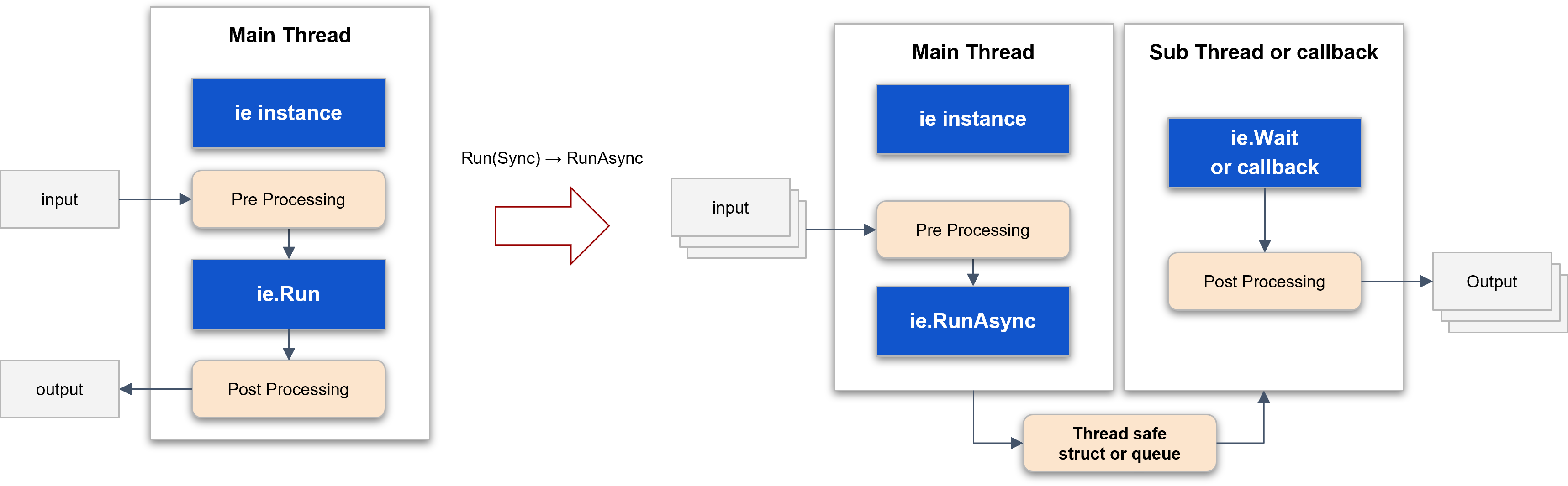
Figure. Converting Run(Sync) to RunAsync
Inference Option
The following inference options allow you to specify an NPU core for performing inference.
Inference Engine Run, Inference Option
- Select devices
: default devices is{}
: Choose devices to utilize - Select bound option per device
:dxrt::InferenceOption::BOUND_OPTION::NPU_ALL
:dxrt::InferenceOption::BOUND_OPTION::NPU_0
:dxrt::InferenceOption::BOUND_OPTION::NPU_1
:dxrt::InferenceOption::BOUND_OPTION::NPU_2
:dxrt::InferenceOption::BOUND_OPTION::NPU_01
:dxrt::InferenceOption::BOUND_OPTION::NPU_12
:dxrt::InferenceOption::BOUND_OPTION::NPU_02 - Use onnx runtime library (
ORT)
:useORTon or off
run_sync_model_bound.cpp
// DX-RT includes
#include <dxrt/dxrt_cxx_api.h>
...

int main()
{
    std::string modelPath = "model-path";

    try
    {

        // select bound option NPU_0 to NPU_2 per device
        dxrt::InferenceOption op;

        // first device only, default null
        op.devices.push_back(0); // use device 0
        op.devices.push_back(3); // use device 3

        // use BOUND_OPTION::NPU_0 only
        op.boundOption = dxrt::InferenceOption::BOUND_OPTION::NPU_0;

        // use ORT
        op.useORT = false;

        // create inference engine instance with model
        dxrt::InferenceEngine ie(modelPath, op);

        // inference loop
        for(int i = 0; i < 100; ++i)
        {
            // input
            uint8_t* inputPtr = readInputData();

            // inference synchronously with boundOption
            // use only one npu core
            // ownership of the outputs is transferred to the user
            auto outputs = ie.Run(inputPtr);

            // post processing
            postProcessing(outputs);

        } // for i
    }
    catch(const dxrt::Exception& e)  // exception for inference engine
    {
        std::cerr << e.what() << " error-code=" << e.code() << std::endl;
        return -1;
    }
    catch(const std::exception& e)
    {
        std::cerr << e.what() << std::endl;
        return -1;
    }

    return 0;
}
If multiple dxrt::InferenceEngine instances are initialized with specific NPU bindings (occupying NPUs 0, 1, and 2), any subsequent attempt to instantiate a new engine using BOUND_OPTION::NPU_ALL will enter a blocking state. The new instance will remain suspended until all required NPU resources become available. This synchronization behavior is consistent across both multi-threaded and multi-process environments.
Configuration and Device Status
This guide explains how to use the Configuration class to set up the inference engine and the DeviceStatus class to monitor hardware status in C++.
Engine Configuration
The Configuration class, implemented as a Singleton, allows you to set global parameters for the inference engine before it runs.
// Get the singleton instance and set engine parameters
dxrt::Configuration::GetInstance().SetEnable(dxrt::Configuration::ITEM::SHOW_MODEL_INFO, true);
dxrt::Configuration::GetInstance().SetEnable(dxrt::Configuration::ITEM::SHOW_PROFILE, true);
Configuration::GetInstance(): Accesses the single, global instance of the configuration manager..SetEnable(...): Enables engine features. Here, it's configured to print detailed model information and performance profiling data when theInferenceEngineis initialized.
Querying Device Status
The DeviceStatus class provides real-time device information including hardware spec, voltage, clock, temperature, NPU core utilization, and DRAM memory usage.
// Get the number of available devices
auto device_count = dxrt::DeviceStatus::GetDeviceCount();

// Loop through each device
for(int i = 0; i < device_count; ++i)
{
    // Get a status object for the current device
    auto device_status = dxrt::DeviceStatus::GetCurrentStatus(i);

    // Query and print specific metrics
    log.Info("Device: " + std::to_string(device_status.GetId()));
    log.Info("   Temperature: " + std::to_string(device_status.GetTemperature(0)));
    log.Info("   Voltage: " + std::to_string(device_status.GetNpuVoltage(0)));
    log.Info("   Clock: " + std::to_string(device_status.GetNpuClock(0)));
    log.Info("   Core Utilization: " + std::to_string(device_status.GetCoreUtilization(0)) + "%");
    log.Info("   Memory Used: " + std::to_string(device_status.GetMemoryUsed()) + " bytes");
    log.Info("   Memory Free: " + std::to_string(device_status.GetMemoryFree()) + " bytes");
}
DeviceStatus::GetDeviceCount(): A static method that returns the number of connected DEEPX devices.DeviceStatus::GetCurrentStatus(i): Returns aDeviceStatusobject containing all device metrics for devicei.device_status.Get...(): Instance methods to retrieve individual metrics such asGetTemperature(),GetNpuVoltage(),GetNpuClock(),GetCoreUtilization(),GetMemoryUsed(),GetMemoryFree().
Profiler Configuration
This guide provides a simple, code-focused manual on how to configure the profiler using the DXRT SDK. The profiler is a powerful tool for analyzing the performance of each layer within your model.
Configuration is managed through the dxrt::Configuration singleton instance.
Enabling the Profiler
Before you can use any profiler features, you must first enable it. This is the essential first step for any profiling activity.
// Enable the profiler feature
dxrt::Configuration::GetInstance().SetEnable(dxrt::Configuration::ITEM::PROFILER, true);
SetEnable: This function activates or deactivates a specific DXRT feature.dxrt::Configuration::ITEM::PROFILER: Specifies that the target feature is the profiler.true: Enables the profiler. Set tofalseto disable it.
Configuration Options
Once enabled, you can set specific attributes for the profiler's behavior.
Displaying Profiler Data in the Console
To see the profiling results printed directly to your console after the inference runs, use the PROFILER_SHOW_DATA attribute.
// Configure the profiler to print its report to the console
dxrt::Configuration::GetInstance().SetAttribute(dxrt::Configuration::ITEM::PROFILER,
                                                 dxrt::Configuration::ATTRIBUTE::PROFILER_SHOW_DATA, "ON");
SetAttribute: Sets a specific property for a DXRT feature.PROFILER_SHOW_DATA: The attribute to control console output."ON": A string value to enable this attribute. Use"OFF"to disable it.
Saving Profiler Data to a File
To save the profiling report to a file for later analysis, use the PROFILER_SAVE_DATA attribute. The resulting report is generated in the same folder with the name profiler.json. 📄
// Configure the profiler to save its report to a file
dxrt::Configuration::GetInstance().SetAttribute(dxrt::Configuration::ITEM::PROFILER,
                                                 dxrt::Configuration::ATTRIBUTE::PROFILER_SAVE_DATA, "ON");
PROFILER_SAVE_DATA: The attribute to control file output."ON": A string value to enable file saving. Use"OFF"to disable it.
Complete Code Example
Here is a complete example showing how to apply all the configurations within a try-catch block before creating the InferenceEngine.
try
{
    // Step 1: Enable the profiler
    dxrt::Configuration::GetInstance().SetEnable(dxrt::Configuration::ITEM::PROFILER, true);

    // Step 2: Set attributes to show data in console and save to a file
    dxrt::Configuration::GetInstance().SetAttribute(dxrt::Configuration::ITEM::PROFILER,
    dxrt::Configuration::ATTRIBUTE::PROFILER_SHOW_DATA, "ON");

    dxrt::Configuration::GetInstance().SetAttribute(dxrt::Configuration::ITEM::PROFILER,
    dxrt::Configuration::ATTRIBUTE::PROFILER_SAVE_DATA, "ON");

    // Step 3: Create the InferenceEngine instance and run inference
    // The profiler will automatically work on the models run by this engine.
    dxrt::InferenceEngine ie(model_path);

    // ... run inference loop ...
}
catch (const dxrt::Exception& e)
{
    // ... handle exceptions ...
}
Camera / Inference / Display
The following is an example of a pattern that performs inference using two models on a single camera input and combines the results from both models for display.
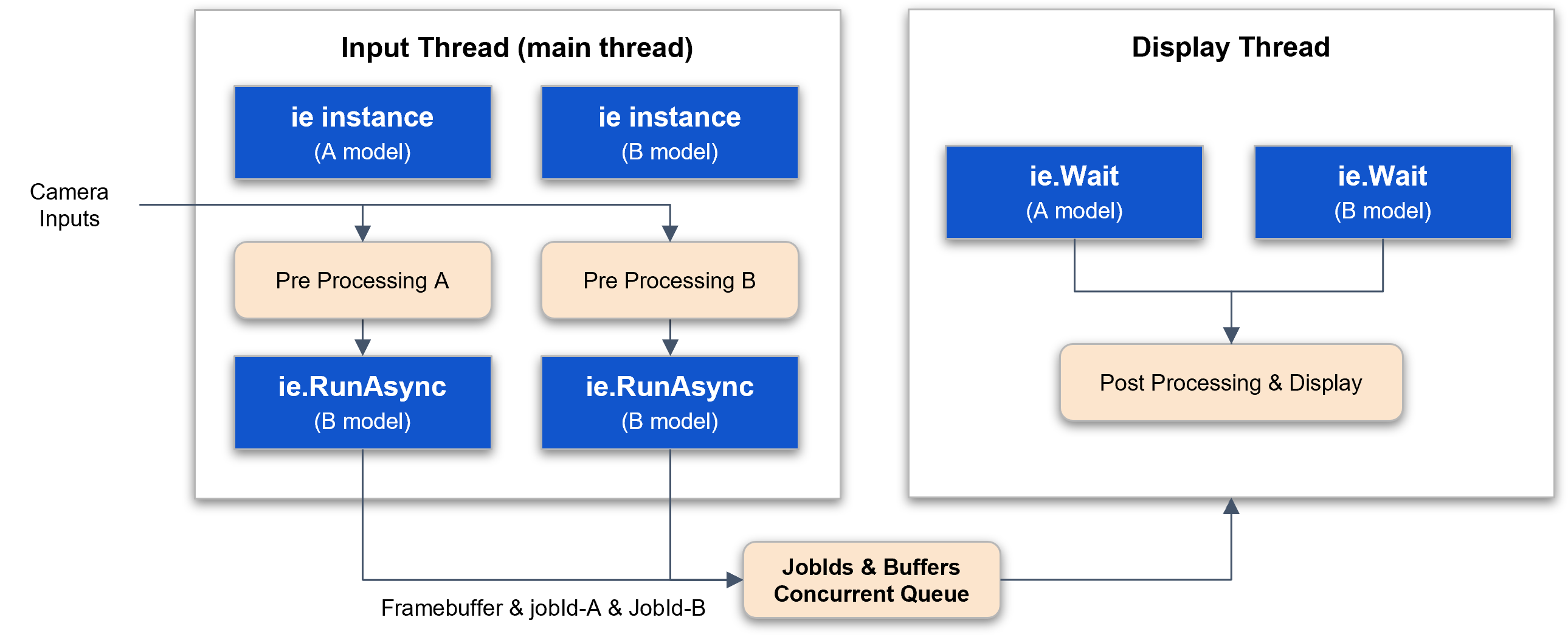
Figure. Multi-model and Multi-output
Multi-model, Async, Wait Thread (CPU_1 → {NPU_1 + NPU_2} → CPU_2)
display_async_wait.cpp
// DX-RT includes
#include <dxrt/dxrt_cxx_api.h>
...

// input processing main thread with 2 InferenceEngine (asynchronous)
// display thread

struct FrameJobId {
    int jobId_A = -1;
    int jobId_B = -1;
    void* frameBuffer = nullptr;
    int loopIndex = -1;
};

static const int BUFFER_POOL_SIZE = 10;
static const int QUEUE_SIZE = 10;

static ConcurrentQueue<FrameJobId> gFrameJobIdQueue(QUEUE_SIZE);
static std::shared_ptr<SimpleCircularBufferPool<uint8_t>> gInputBufferPool_A;
static std::shared_ptr<SimpleCircularBufferPool<uint8_t>> gInputBufferPool_B;
static std::shared_ptr<SimpleCircularBufferPool<uint8_t>> gFrameBufferPool;

// total display count
static std::atomic<int> gTotalDisplayCount = {0};

static int displayThreadFunc(int loopCount, dxrt::InferenceEngine& ieA, dxrt::InferenceEngine& ieB)
{

    while(gTotalDisplayCount.load() < loopCount)
    {
        // consumer framebuffer & jobIds
        auto frameJobId = gFrameJobIdQueue.pop();

        // output data of ieA
        auto outputA = ieA.Wait(frameJobId.jobId_A);

        // output data of ieB
        auto outputB = ieB.Wait(frameJobId.jobId_B);

        // post-processing w/ outputA & outputB
        postProcessing(outputA, outputB);

        gTotalDisplayCount++;

        // display (update framebuffer)
    }

    return 0;
}


int main(int argc, char* argv[])
{
    ...

    try
    {

        // create inference engine instance with model
        dxrt::InferenceEngine ieA(modelPath_A);

        gInputBufferPool_A = std::make_shared<SimpleCircularBufferPool<uint8_t>>(BUFFER_POOL_SIZE, ieA.GetInputSize());

        // create inference engine instance with model
        dxrt::InferenceEngine ieB(modelPath_B);

        gInputBufferPool_B = std::make_shared<SimpleCircularBufferPool<uint8_t>>(BUFFER_POOL_SIZE, ieB.GetInputSize());

        const int W = 512, H = 512, CH = 3;
        gFrameBufferPool = std::make_shared<SimpleCircularBufferPool<uint8_t>>(BUFFER_POOL_SIZE, W*H*CH);

        // create thread
        std::thread displayThread(displayThreadFunc, loop_count, std::ref(ieA), std::ref(ieB));

        // input processing
        for(int i = 0; i < loop_count; ++i)
        {
            uint8_t* frameBuffer = gFrameBufferPool->pointer();
            readFrameBuffer(frameBuffer, W, H, CH);

            uint8_t* inputA = gInputBufferPool_A->pointer();
            preProcessing(inputA, frameBuffer);

            uint8_t* inputB = gInputBufferPool_B->pointer();
            preProcessing(inputB, frameBuffer);

            // struct to pass to cpu operation thread
            FrameJobId frameJobId;

            // start inference of A model
            frameJobId.jobId_A = ieA.RunAsync(inputA);

            // start inference of B model
            frameJobId.jobId_B = ieB.RunAsync(inputB);

            // framebuffer used for input data
            frameJobId.frameBuffer = frameBuffer;
            frameJobId.loopIndex = i;

            // producer frame & jobId
            gFrameJobIdQueue.push(frameJobId);

        }

        displayThread.join();


    }
    catch (const dxrt::Exception& e)
    {
        std::cerr << e.what() << " error-code=" << e.code() << std::endl;
        return -1;
    }
    catch (const std::exception& e)
    {
        std::cerr << e.what() << std::endl;
        return -1;
    }
    catch(...)
    {
        std::cerr << "Exception" << std::endl;
        return -1;
    }

    return 0;
}
The following is an example of a pattern that sequentially performs operations using two models and CPU processing. The inference result from Model A is processed through CPU computation and then used as input data for Model B. Finally, the result from Model B is handled for display.
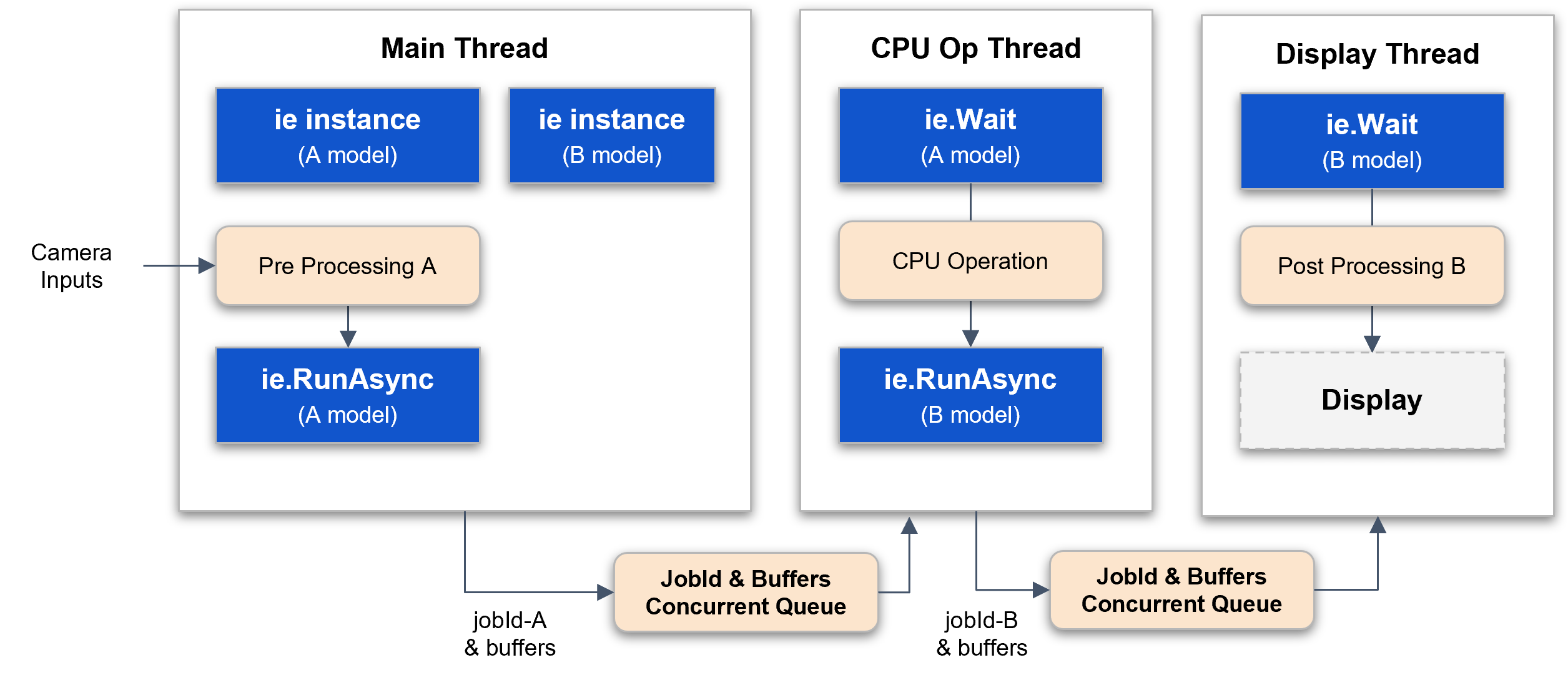
Figure. CPU and NPU Pipeline Operation
Multi-model, Async, Wait Thread (CPU_1 → NPU_1 → CPU_2 → NPU_2 → CPU_3)
display_async_pipe.cpp
// DX-RT includes
#include <dxrt/dxrt_cxx_api.h>
...

// input main thread
// 1 cpu processing thread
// 1 display thread

struct FrameJobId {
    int jobId_A = -1;
    int jobId_B = -1;
    uint8_t* inputBufferA;
    uint8_t* inputBufferB;
    void* frameBuffer = nullptr;

    int loopIndex;
};

static const int BUFFER_POOL_SIZE = 10;
static const int QUEUE_SIZE = 10;

static ConcurrentQueue<FrameJobId> gCPUOPQueue(QUEUE_SIZE);
static ConcurrentQueue<FrameJobId> gDisplayQueue(QUEUE_SIZE);
static std::shared_ptr<SimpleCircularBufferPool<uint8_t>> gInputBufferPool_A;
static std::shared_ptr<SimpleCircularBufferPool<uint8_t>> gInputBufferPool_B;
static std::shared_ptr<SimpleCircularBufferPool<uint8_t>> gFrameBufferPool;

// total display count
static std::atomic<int> gTotalDisplayCount = {0};


static int displayThreadFunc(int loopCount, dxrt::InferenceEngine& ieB)
{

    while(gTotalDisplayCount.load() < loopCount)
    {
        // consumer framebuffer & jobIds
        auto frameJobId = gDisplayQueue.pop();

        // output data of ieB
        auto outputB = ieB.Wait(frameJobId.jobId_B);

        // post-processing w/ outputA & outputB
        postProcessingB(outputB);

        gTotalDisplayCount++;

        // display (update framebuffer)
        if ( frameJobId.loopIndex == (loopCount - 1)) break;
    }

    return 0;
}

static int cpuOperationThreadFunc(int loopCount, dxrt::InferenceEngine& ieA, dxrt::InferenceEngine& ieB)
{

    while(gTotalDisplayCount.load() < loopCount)
    {
        // consumer framebuffer & jobIds
        auto frameJobIdA = gCPUOPQueue.pop();

        // output data of ieA
        auto outputA = ieA.Wait(frameJobIdA.jobId_A);

        // post-processing w/ outputA
        postProcessingA(frameJobIdA.inputBufferB, outputA);

        FrameJobId frameJobIdB;
        frameJobIdB.loopIndex = frameJobIdA.loopIndex;
        frameJobIdB.jobId_B = ieB.RunAsync(frameJobIdA.inputBufferB);

        gDisplayQueue.push(frameJobIdB);

        // display (update framebuffer)
        if ( frameJobIdA.loopIndex == (loopCount - 1)) break;
    }

    return 0;
}


int main(int argc, char* argv[])
{

    ...

    try
    {

        // create inference engine instance with model
        dxrt::InferenceEngine ieA(modelPath);

        gInputBufferPool_A = std::make_shared<SimpleCircularBufferPool<uint8_t>>(BUFFER_POOL_SIZE, ieA.GetInputSize());

        // create inference engine instance with model
        dxrt::InferenceEngine ieB(modelPath);

        gInputBufferPool_B = std::make_shared<SimpleCircularBufferPool<uint8_t>>(BUFFER_POOL_SIZE, ieB.GetInputSize());

        const int W = 512, H = 512, CH = 3;
        gFrameBufferPool = std::make_shared<SimpleCircularBufferPool<uint8_t>>(BUFFER_POOL_SIZE, W*H*CH);

        // create thread
        std::thread cpuOperationThread(cpuOperationThreadFunc, loop_count, std::ref(ieA), std::ref(ieB));
        std::thread displayThread(displayThreadFunc, loop_count, std::ref(ieB));


        // input processing
        for(int i = 0; i < loop_count; ++i)
        {
            uint8_t* frameBuffer = gFrameBufferPool->pointer();
            readFrameBuffer(frameBuffer, W, H, CH);

            uint8_t* inputA = gInputBufferPool_A->pointer();
            preProcessing(inputA, frameBuffer);

            // struct to pass to a thread
            FrameJobId frameJobId;

            frameJobId.inputBufferA = inputA;
            frameJobId.inputBufferB = gInputBufferPool_B->pointer();

            // start inference of A model
            frameJobId.jobId_A = ieA.RunAsync(inputA);

            // framebuffer used for input data
            frameJobId.frameBuffer = frameBuffer;
            frameJobId.loopIndex = i;

            // producer frame & jobId
            gCPUOPQueue.push(frameJobId);

        }

        cpuOperationThread.join();
        displayThread.join();

    }
    catch (const dxrt::Exception& e)
    {
        std::cerr << e.what() << " error-code=" << e.code() << std::endl;
        return -1;
    }
    catch (const std::exception& e)
    {
        std::cerr << e.what() << std::endl;
        return -1;
    }
    catch(...)
    {
        std::cerr << "Exception" << std::endl;
        return -1;
    }

    return 0;
}
Exception
The error codes and types of exceptions for error handling are as follows.
enum ERROR_CODE {
        DEFAULT = 0x0100,
        FILE_NOT_FOUND,
        NULL_POINTER,
        FILE_IO,
        INVALID_ARGUMENT,
        INVALID_OPERATION,
        INVALID_MODEL,
        MODEL_PARSING,
        SERVICE_IO,
        DEVICE_IO
    };
- FileNotFoundException
- NullPointerException
- FileIOException
- InvalidArgumentException
- InvalidOperationException
- InvalidModelException
- ModelParsingException
- ServiceIOException
- DeviceIOException
    // try/catch prototype

    try
    {
        // DX-RT APIs ...
    }
    catch(const dxrt::Exception& e)  // exception for inference engine
    {
        std::cerr << e.what() << " error-code=" << e.code() << std::endl;
        return -1; // or std::exit(-1);
    }
    catch(std::exception& e)
    {
        std::cerr << e.what() << std::endl;
        return -1;  // or std::exit(-1);
    }
Multi-Input Inference
This guide explains various methods for performing inference on multi-input models using the dxrt::InferenceEngine. The examples cover different input formats, synchronous and asynchronous execution, and batch processing.
Model Information
Before running inference, it's useful to inspect the model's properties. The printModelInfo function shows how to query the inference engine for details about the model's input and output tensors.
ie.IsMultiInputModel(): Checks if the loaded model has multiple inputs.ie.GetInputTensorCount(): Gets the number of input tensors.ie.GetInputTensorNames(): Retrieves the names of all input tensors.ie.GetInputTensorSizes(): Gets the size (in bytes) of each input tensor.ie.GetOutputTensorNames()/ie.GetOutputTensorSizes(): Provide similar information for output tensors.
void printModelInfo(dxrt::InferenceEngine& ie) {
    if (ie.IsMultiInputModel()) {
        std::cout << "Input tensor count: " << ie.GetInputTensorCount() << std::endl;
        auto inputNames = ie.GetInputTensorNames();
        auto inputSizes = ie.GetInputTensorSizes();
        for (size_t i = 0; i < inputNames.size(); ++i) {
            std::cout << "  " << inputNames[i] << ": " << inputSizes[i] << " bytes" << std::endl;
        }
    }
}
Synchronous Single Inference
These examples demonstrate different ways to run a single inference request synchronously.
Input Formats
A. Dictionary Format (std::map<std::string, void*>)
This is the most robust method. You provide a map where keys are the tensor names and values are pointers to the input data. This format is not sensitive to the order of tensors.
- API:
ie.RunMultiInput(inputTensors) - Use Case: Recommended for clarity and to avoid errors from tensor reordering.
// Create input data
std::map<std::string, void*> inputTensors;
inputTensors["input_1"] = inputData1.data();
inputTensors["input_2"] = inputData2.data();

// Run inference
auto outputs = ie.RunMultiInput(inputTensors);
B. Vector Format (std::vector<void*>)
You provide a vector of pointers to the input data. The order of pointers in the vector must match the order returned by ie.GetInputTensorNames().
- API:
ie.RunMultiInput(inputPtrs) - Use Case: When tensor order is known and fixed. Can be slightly more performant than the map-based approach due to less overhead.
// Create input data in the correct order
std::vector<void*> inputPtrs;
inputPtrs.push_back(inputData1.data()); // Corresponds to first name in GetInputTensorNames()
inputPtrs.push_back(inputData2.data()); // Corresponds to second name

// Run inference
auto outputs = ie.RunMultiInput(inputPtrs);
C. Auto-Split Concatenated Buffer
You provide a single, contiguous buffer containing all input data concatenated together. The engine automatically splits this buffer into the correct tensor inputs based on their sizes. The concatenation order must match the order from ie.GetInputTensorNames().
- API:
ie.Run(concatenatedInput.data()) - Use Case: Efficient when input data is already in a single block or when interfacing with systems that provide data this way.
// Create a single buffer with all input data concatenated
auto concatenatedInput = createDummyInput(ie.GetInputSize());

// Run inference
auto outputs = ie.Run(concatenatedInput.data());
Output Buffer Management
For each synchronous method, you can either let the engine allocate output memory automatically or provide a pre-allocated buffer for performance gains.
-
Auto-Allocated Output (No Buffer Provided): Simpler to use. The engine returns smart pointers to newly allocated memory.
// Engine allocates and manages output memoryauto outputs = ie.RunMultiInput(inputTensors); -
User-Provided Output Buffer: More performant as it avoids repeated memory allocations. The user is responsible for allocating a buffer of size
ie.GetOutputSize().// User allocates the output bufferstd::vector<uint8_t> outputBuffer(ie.GetOutputSize());// Run inference, placing results in the provided bufferauto outputs = ie.RunMultiInput(inputTensors, nullptr, outputBuffer.data());
Synchronous Batch Inference
For processing multiple inputs at once to maximize throughput, you can use the batch inference API. This is more efficient than running single inferences in a loop.
- API:
ie.Run(batchInputPtrs, batchOutputPtrs, userArgs) - Input: A vector of pointers, where each pointer is a concatenated buffer for one sample in the batch.
- Output: A vector of pointers, where each pointer is a pre-allocated buffer for the corresponding sample's output.
int batchSize = 3;
std::vector<void*> batchInputPtrs;
std::vector<void*> batchOutputPtrs;

// Prepare input and output buffers for each sample in the batch
for (int i = 0; i < batchSize; ++i) {
    // Each input is a full concatenated buffer
    batchInputData[i] = createDummyInput(ie.GetInputSize());
    batchInputPtrs.push_back(batchInputData[i].data());

    // Pre-allocate output buffer for each sample
    batchOutputData[i].resize(ie.GetOutputSize());
    batchOutputPtrs.push_back(batchOutputData[i].data());
}

// Run batch inference
auto batchOutputs = ie.Run(batchInputPtrs, batchOutputPtrs);
Asynchronous Inference
Asynchronous APIs allow you to submit inference requests without blocking the calling thread. The results are returned later via a callback function. This is ideal for applications that need to remain responsive, such as those with a user interface.
- APIs:
ie.RunAsyncMultiInput(inputTensors, userArg)ie.RunAsync(concatenatedInput.data(), userArg)
- Callback Registration:
ie.RegisterCallback(callback_function)
The AsyncInferenceHandler class demonstrates how to manage state across multiple asynchronous calls.
- Register a Callback: Provide a function that the engine will call upon completion of each async request. The callback receives the output tensors and a
userArgpointer for context. - Submit Requests: Call an
RunAsyncvariant. This call returns immediately with a job ID. - Process in Callback: The callback function is executed in a separate worker thread. Here, you can process the results. It's crucial to ensure thread safety if you modify shared data.
// 1. Create a handler and register its callback method
AsyncInferenceHandler handler(asyncCount);
ie.RegisterCallback([&handler](dxrt::TensorPtrs& outputs, void* userArg) -> int {
    return handler.callback(outputs, userArg);
});

// 2. Submit multiple async requests in a loop
for (int i = 0; i < asyncCount; ++i) {
    void* userArg = reinterpret_cast<void*>(static_cast<uintptr_t>(i));
    // Each call is non-blocking
    ie.RunAsyncMultiInput(asyncInputTensors[i], userArg);
}

// 3. Wait for all callbacks to complete
handler.waitForCompletion();

// 4. Clear the callback when done
ie.RegisterCallback(nullptr);
Examples
The DX-RT SDK provides comprehensive C++ examples in the examples/cpp/ directory. These examples demonstrate various inference patterns, configuration options, and performance optimization techniques. All examples are ready to build and run.
Location: examples/cpp/
Basic Inference Examples
-
run_sync_model
Demonstrates synchronous inference using a single thread. This is the simplest way to perform inference, suitable for sequential processing. -
run_async_model
Performance-optimized asynchronous inference using callback functions. Demonstrates how to maximize NPU utilization with non-blocking execution. -
run_async_model_wait
Asynchronous inference using theWait()method instead of callbacks, providing more control over output retrieval timing. -
run_batch_model
Shows how to perform batch inference to process multiple inputs simultaneously, improving throughput for batch-oriented workloads.
Configuration Examples
-
run_sync_model_bound
Demonstrates how to bind inference to specific NPU cores usingInferenceOption.boundOptionfor fine-grained resource control. -
run_async_model_bound
Asynchronous version of NPU core binding, showing how to control which NPU cores execute async tasks. -
run_sync_model_bufcount
Illustrates buffer count configuration withInferenceOption.bufferCountto optimize memory usage in synchronous mode. -
run_async_model_bufcount
Shows buffer count tuning for asynchronous inference to balance throughput and memory consumption. -
run_async_model_conf
Comprehensive example of usingdxrt::Configurationto set runtime parameters and monitor device status.
Memory Management Examples
-
run_sync_model_memory
Demonstrates loading models from memory buffers instead of files, useful for embedded systems or when models are loaded from custom sources. -
run_sync_model_output
Shows how to provide pre-allocated output buffers to the inference engine, giving you control over output memory management. -
run_async_model_output
Asynchronous inference with user-managed output buffers, demonstrating zero-copy output handling.
Profiling Examples
run_async_model_profiler
Demonstrates how to enable and use the DX-RT profiler to collect detailed timing information for performance analysis.
Multi-Input Model Examples
multi_input_model_inference
Shows how to handle models with multiple input tensors, including proper buffer preparation and data layout.
Advanced Pipeline Examples
-
display_async_pipe
Pipeline pattern:[CPU_1 → {NPU_1 + NPU_2} → CPU_2]
Demonstrates preprocessing on CPU, parallel NPU execution, and postprocessing. -
display_async_wait
Sequential pattern:[CPU_1 → NPU_1 → CPU_2 → NPU_2 → CPU_3]
Shows how to chain multiple processing stages with intermediate CPU tasks. -
display_async_thread
Single model with multiple threads, demonstrating concurrent inference requests to the same model. -
display_async_models_1
Multi-model multi-thread example where each thread creates its ownInferenceEngineinstance. -
display_async_models_2
Multi-model multi-thread example whereInferenceEngineinstances are created in the main thread and shared.
Building and Running Examples
All examples can be built using CMake:
cd examples/cpp
mkdir build && cd build
cmake ..
make

# Run an example (replace with actual model path)
./run_sync_model -m /path/to/model.dxnn -l 100
./run_async_model -m /path/to/model.dxnn -l 1000 -v
./run_batch_model -m /path/to/model.dxnn -b 4 -l 100
Most examples support the following common options:
-m, --model: Path to the model file (.dxnn)-l, --loops: Number of inference iterations-v, --verbose: Enable verbose/debug logging-h, --help: Display usage information