DXNN Application Overview
DEEPX SDK Architecture
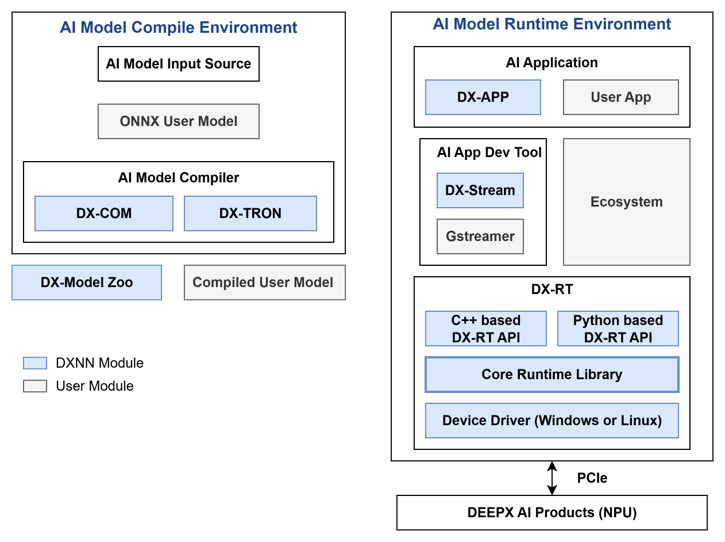
DEEPX SDK is an all-in-one software development platform that streamlines the process of compiling, optimizing, simulating, and deploying AI inference applications on DEEPX NPUs (Neural Processing Units). It provides a complete toolchain, from AI model creation to runtime deployment, optimized for edge and embedded systems, enabling developers to build high-performance AI applications with minimal effort.
DX-COM is the compiler in the DEEPX SDK that converts a pre-trained ONNX model and its associated configuration JSON file into a hardware-optimized .dxnn binary for DEEPX NPUs. The ONNX file contains the model structure and weights, while the JSON file defines pre/post-processing settings and compilation parameters. DX-COM provides a fully compiled .dxnn file, optimized for low-latency and high-efficient inference on DEEPX NPU.
DX-RT is the runtime software responsible for executing .dxnn models on DEEPX NPU hardware. DX-RT directly interacts with the DEEPX NPU through firmware and device drivers, using PCIe interface for high-speed data transfer between the host and the NPU, and provides C/C++ and Python APIs for application-level inference control. DX-RT offers a complete runtime environment, including model loading, I/O buffer management, inference execution, and real-time hardware monitoring.
DX ModelZoo is a curated collection of pre-trained neural network models optimized for DEEPX NPU, designed to simplify AI development for DEEPX users. It includes pre-trained ONNX models, configuration JSON files, and pre-compiled DXNN binaries, allowing developers to rapidly test and deploy applications. DX ModelZoo also provides benchmark tools for comparing the performance of quantized INT8 models on DEEPX NPU with full-precision FP32 models on CPU or GPU.
DX-STREAM is a custom GStreamer plugin that enables real-time streaming data integration into AI inference applications on DEEPX NPU. It provides a modular pipeline framework with configurable elements for preprocessing, inference, and postprocessing, tailored to vision AI work. DX-Stream allows developers to build flexible, high-performance applications for use cases such as video analytics, smart cameras, and edge AI systems.
DX-APP is a collection of runnable example applications that execute compiled models on DEEPX NPUs through DX-RT. It provides examples across 22 AI task categories including classification, object detection, face detection, pose estimation, semantic/instance segmentation, depth estimation, OBB detection, embedding, image denoising, enhancement, super resolution, hand landmark detection, attribute recognition, person re-identification, face alignment, keypoint detection, object pose estimation, panoptic driving perception, 3D object detection, and hand detection. The current DX-APP repository is organized around refactored src/cpp_example/ and src/python_example/ trees, each with their own shared runtime layer (common/) providing base interfaces, processors, runners, visualizers, and utilities via a factory pattern. Additionally, src/postprocess/ provides C++ post-processing consumed by pybind11 bindings for *_cpp_postprocess.py variants. DX-APP is intended both as a quick-start runtime package for users and as a reusable application baseline for further customization. Below are representative run examples.
DX-APP Features
DX-APP provides ready-to-use examples for image classification, object detection, segmentation, pose estimation, and related inference tasks.
You can quickly evaluate inference capabilities without modifying the source code and then expand toward task- and model-specific customization. The current example set is backed by a refactored source layout, shared post-processing modules, and a DX-ModelZoo-based asset preparation flow.
Application performance may vary depending on host system specifications. Each demo includes pre-processing, post-processing, and graphics processing operations.
For installation and build steps, refer to DX-APP Installation and Build. For agent workflows, refer to DX-APP Agent-Driven Development Guide. For C++ and Python example usage details, refer to DX-APP C++ Usage Guide and DX-APP Python Usage Guide.
Example Catalog
DX-APP examples are optimized to showcase pre-compiled models on DEEPX NPUs with minimal setup. Assets are prepared through the standard setup flow, and representative examples can be executed using images, videos, or live camera input.
Classification (EfficientNet-Lite0)
- Input: image (e.g.,
224x224) - Output: Top-1 class
- Example run
./bin/efficientnet_lite0_async -m ./assets/models/EfficientNet_Lite0.dxnn -i ./sample/ILSVRC2012/0.jpeg -l 1
./bin/efficientnet_lite0_sync  -m ./assets/models/EfficientNet_Lite0.dxnn -i ./sample/ILSVRC2012/0.jpeg -l 1
Object Detection (YOLOv8N)
- Input: image/video/camera/RTSP
- Output: boxes rendered and logged
- Example run
./bin/yolov8n_async -m ./assets/models/YoloV8N.dxnn -i ./sample/img/sample_kitchen.jpg --no-display -l 1
./bin/yolov8n_sync  -m ./assets/models/YoloV8N.dxnn -i ./sample/img/sample_kitchen.jpg --no-display -l 1 -s
Face Detection (SCRFD)
- Input: image
- Output: face boxes, landmarks, log
- Example run
./bin/scrfd500m_async -m ./assets/models/SCRFD500M.dxnn -i ./sample/img/sample_face.jpg --no-display -l 1
./bin/scrfd500m_sync  -m ./assets/models/SCRFD500M.dxnn -i ./sample/img/sample_face.jpg --no-display -l 1 -s
Pose Estimation (YOLOv8s Pose)
- Input: image/video/camera
- Output: person boxes + keypoints
- Example run
./bin/yolov8s_pose_async -m ./assets/models/yolov8s_pose.dxnn -i ./sample/img/sample_kitchen.jpg --no-display -l 1
./bin/yolov8s_pose_sync  -m ./assets/models/yolov8s_pose.dxnn -i ./sample/img/sample_kitchen.jpg --no-display -l 1 -s
Segmentation (DeepLabV3+)
- Input: image/video/camera
- Output: boxes + masks rendered, results saved
- Example run
./bin/deeplabv3plusmobilenet_async -m ./assets/models/DeepLabV3PlusMobilenet.dxnn -i ./sample/img/sample_parking.jpg --no-display -l 1
./bin/deeplabv3plusmobilenet_sync  -m ./assets/models/DeepLabV3PlusMobilenet.dxnn -i ./sample/img/sample_parking.jpg --no-display -l 1 -s
Semantic Segmentation (BiSeNetV1)
- Input: image/video/camera
- Output: segmentation masks rendered
- Example run
./bin/bisenetv1_async -m ./assets/models/BiSeNetV1.dxnn -i ./sample/img/sample_parking.jpg --no-display -l 1
./bin/bisenetv1_sync  -m ./assets/models/BiSeNetV1.dxnn -i ./sample/img/sample_parking.jpg --no-display -l 1 -s
DX-APP Core Design & Capabilities
DX-APP is engineered to maximize NPU throughput while minimizing CPU-side bottlenecks.
Unified Post-Processing Engine
To ensure consistency and speed, all model-specific decoding (NMS, box scaling, mask generation) is implemented in optimized C++ libraries.
- Cross-Language Parity: These modules are exposed to Python via
pybind11(dx_postprocess), ensuring Python developers achieve C++-level performance. - Logic Standardization: Identical decoding logic across both environments guarantees consistent inference results.
Execution Paradigms: Sync vs. Async
Templates are provided in two variants to help developers optimize for their specific use cases
- Synchronous (Sync): Sequential execution (Pre → Inference → Post). Best for single-image analysis and simplified debugging.
- Asynchronous (Async): A multi-threaded design using
RunAsync()to overlap stages. While the NPU processes Frame N, the CPU prepares Frame N+1 and post-processes Frame N-1. This is critical for maximizing FPS on real-time video or RTSP streams.
Performance Profiling & Bottleneck Analysis
Every application template in DX-APP—regardless of the language (C++/Python) or execution paradigm (Sync/Async)—is equipped with a built-in performance profiler. Upon completion, the console outputs a Performance Summary that serves as a critical tool for application tuning.
Key Metrics Collected
- Stage Latency: Precise timing for each stage of the pipeline
: Pre-processing: Image decoding, resizing, and normalization
: NPU Inference: Pure execution time on the DEEPX NPU via DX-RT
: Post-processing: Result decoding (NMS, box scaling, etc.)
: Display/I/O: Time taken to render or save the output - End-to-End Throughput (FPS): The overall frames per second achieved by the entire system.
Strategic Objectives
- Bottleneck Identification: Instantly determine if the system is limited by CPU-side tasks (Pre/Post-processing) or NPU throughput. For instance, if post-processing latency is high in a Python script, you can strategically switch to the C++ Binding (
dx_postprocess) variant. - Architectural Benchmarking: Quantitatively validate how much performance is gained by moving from a Synchronous to an Asynchronous design.
- Resource Optimization: Help developers balance NPU utilization and CPU overhead to find the "sweet spot" for their specific hardware and commercial use case.