DXNN - DEEPX NPU SDK
DX-AllSuite (DEEPX All Suite) is an all-in-one software platform designed to streamline the entire process of compiling, optimizing, and deploying AI inference applications on DEEPX NPUs. It ensures optimal compatibility and powerful hardware performance through a complete toolchain that covers everything from model creation to real-world "Physical AI" deployment.
Full Architecture Overview
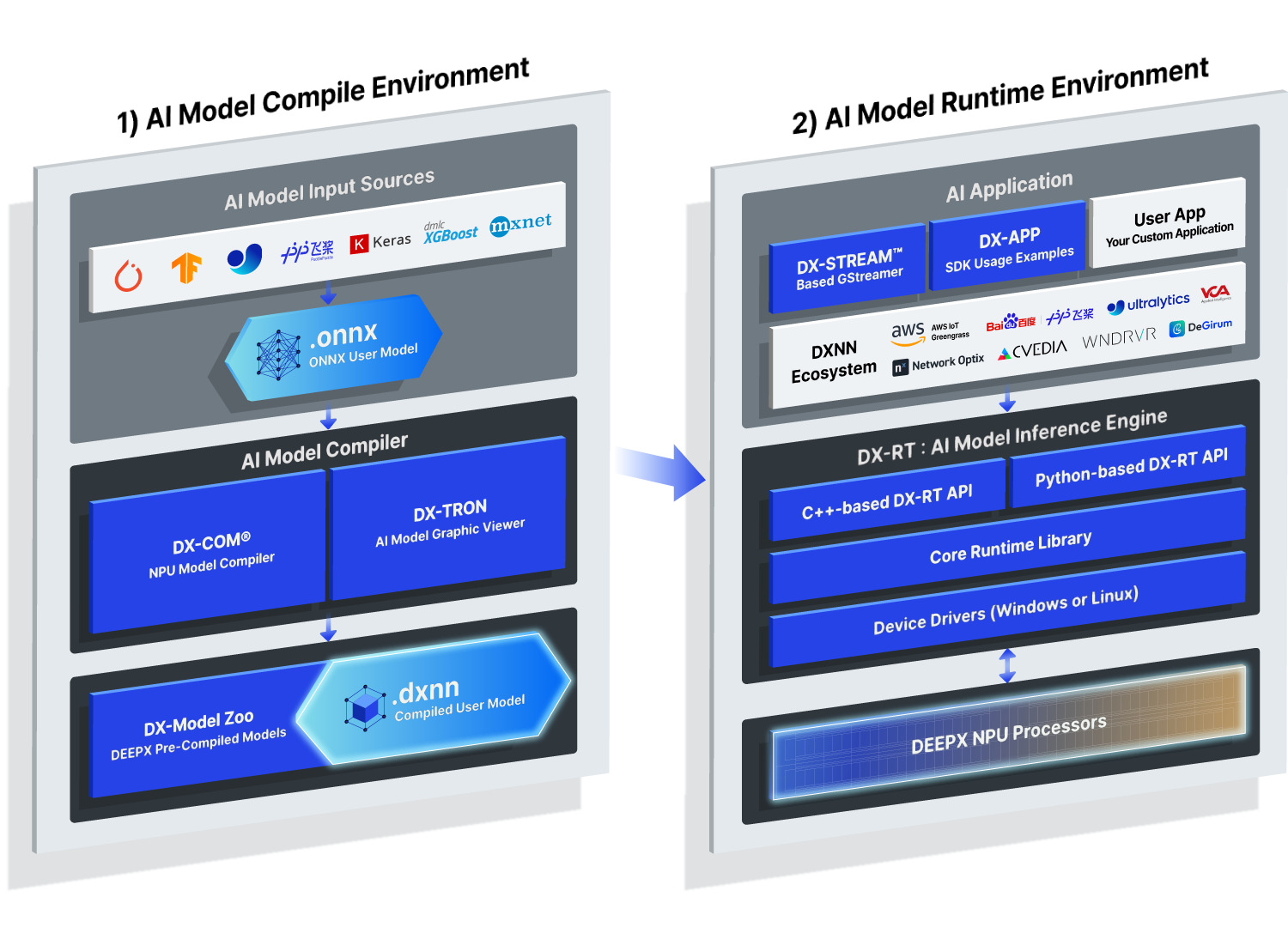
Figure. DXNN SDK Full Architecture Overview.
Key Features
- High Efficiency: Equipped with the proprietary DX-COM compiler that extracts 100% of NPU performance. It utilizes advanced quantization (Intelligent Quantization with INT8) to minimize accuracy loss while maximizing inference speed.
- Seamless Integration: Build intelligent video analytics pipelines that bridge the entire pre-processing, inference, and post-processing workflow. Using DX-Stream (GStreamer-based custom plugins), you can deploy complex vision tasks without extensive code modifications.
- Flexible Ecosystem: Fully supports Python and C++ APIs and offers a ModelZoo with over 270 optimized models. As a leader in the Open-Source Physical AI Alliance, we provide seamless workflows for popular frameworks.
Getting Started
DX-AllSuite provides two environments depending on your intended use. Choose the environment that fits your needs to get started.
AI Model Compile Environment (Host PC)
This environment is used for converting and optimizing trained AI models into DEEPX NPU-specific binaries.
- Arch: x86_64
- OS: Ubuntu 24.04 / 22.04 / 20.04 (LTS), Fedora, Redhat, CentOS
- Hardware: x86_64 Host PC
- Software: Python 3.8~3.12, CUDA (Optional for simulation)
- Key Tasks: AI model (
.onnx) compilation, Quantization,.dxnngeneration - Action: DX-Compiler Local Installation Guide [Link]
AI Model Runtime Environment (Target Device)
This environment is for performing inference and running applications on devices physically equipped with DEEPX NPUs.
- Arch: x86_64, aarch64
- OS: Ubuntu 24.04 / 22.04 / 20.04 / 18.04 (LTS), Debian 13 / 12
- Hardware: Host PC / Target Board (DEEPX NPU is required)
- Software: Python 3.8+
- Key Tasks:
.dxnnmodel execution, real-time data inference, resource management - Action: DX-Runtime Installation Guide [Link]
A system reboot is mandatory after installation to properly load the NPU Driver into the kernel.
sudo reboot
Supported Models
DX-AllSuite supports a vast array of industry-standard AI architectures, optimized for peak performance on our NPU.
- Image Classification: AlexNet, ResNet/ResNeXt/WideResNet, MobileNet, EfficientNet (Lite/V2), ViT/DeiT/BEiT, MobileViT, FastViT, CasViT, RegNet, ShuffleNet, VGG, and more.
- Object Detection: YOLO families (YOLOv3–YOLOv11, YOLOX, YOLO26), SSD, EfficientDet, NanoDet, DamoYOLO.
- Segmentation: DeepLabV3/DeepLabV3+, SegFormer, BiSeNet, UNet, YOLACT, and YOLO-based segmentation variants (YOLOv5/YOLOv8/YOLO26).
- Advanced Vision Tasks: Face analysis (Detection, Recognition, Landmarks, Attributes), Human/Hand Pose Estimation, Low-Light Enhancement, Image Denoising, Super Resolution, Depth Estimation, Oriented Object Detection (OBB), Zero-Shot Instance Segmentation, and Person Attributes.
Instead of compiling models yourself, you can download ready-to-use binaries from the DEEPX ModelZoo, which features over 270 optimized models.
Documentation Navigation
If you are a first-time user, we recommend following the documentation in this order.
- Step 1. DX-AllSuite Architecture Overview: SDK overview, module descriptions, and ModelZoo usage
- Step 2. Setting Up Environment: Detailed Local/Docker installation and troubleshooting
- Step 3. Running Your First NPU Model: Step-by-step hands-on script execution
- Step 4. Checking Version Compatibility: SDK, Driver, and Firmware dependency matrix
- Step 5. FAQ Troubleshooting Guide: Solutions for environment conflicts and GUI session (X11) errors
Support
The DEEPX Technical Support Team is here to help you build smooth AI solutions.
- DEEPX Developer Portal: https://developer.deepx.ai (Latest documentation and SDK release notes)
- Technical Support: tech_support@deepx.ai (Consultation on custom model deployment and hardware integration)