DXNN Application Overview
DEEPX SDK Architecture
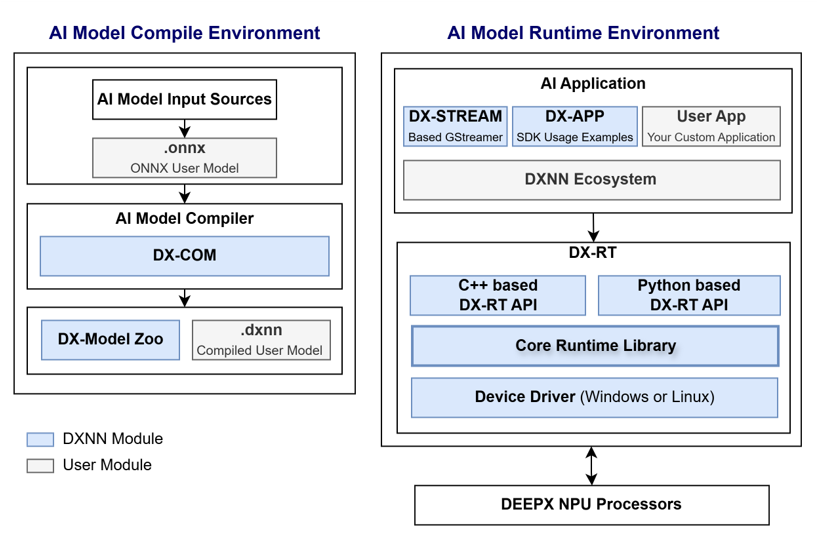
DEEPX SDK is an all-in-one software development platform that streamlines the process of compiling, optimizing, simulating, and deploying AI inference applications on DEEPX NPUs (Neural Processing Units). It provides a complete toolchain, from AI model creation to runtime deployment, optimized for edge and embedded systems, enabling developers to build high-performance AI applications with minimal effort.
DX-COM is the compiler in the DEEPX SDK that converts a pre-trained ONNX model and its associated configuration JSON file into a hardware-optimized .dxnn binary for DEEPX NPUs. The ONNX file contains the model structure and weights, while the JSON file defines pre/post-processing settings and compilation parameters. DX-COM provides a fully compiled .dxnn file, optimized for low-latency and highly efficient inference on DEEPX NPU.
DX-RT is the runtime software responsible for executing .dxnn models on DEEPX NPU hardware. DX-RT directly interacts with the DEEPX NPU through firmware and device drivers, using PCIe interface for high-speed data transfer between the host and the NPU, and provides C/C++ and Python APIs for application-level inference control. DX-RT offers a complete runtime environment, including model loading, I/O buffer management, inference execution, and real-time hardware monitoring.
DX ModelZoo is a curated collection of pre-trained neural network models optimized for DEEPX NPU, designed to simplify AI development for DEEPX users. It includes pre-trained ONNX models, configuration JSON files, and pre-compiled DXNN binaries, allowing developers to rapidly test and deploy applications. DX ModelZoo also provides benchmark tools for comparing the performance of quantized INT8 models on DEEPX NPU with full-precision FP32 models on CPU or GPU.
DX-STREAM is a custom GStreamer plugin that enables real-time streaming data integration into AI inference applications on DEEPX NPU. It provides a modular pipeline framework with configurable elements for preprocessing, inference, and postprocessing, tailored to vision AI work. DX-STREAM allows developers to build flexible, high-performance applications for use cases such as video analytics, smart cameras, and edge AI systems.
DX-APP is a collection of runnable example applications that execute compiled models on DEEPX NPUs through DX-RT. It provides C++ and Python examples, each in sync and async variants, across 29 AI task categories, including image classification, object detection, face detection, pose estimation, segmentation, depth estimation, and super resolution. DX-APP is intended both as a quick-start runtime package for users and as a reusable application baseline for further customization.
Examples are organized by task, family, and variant under src/cpp_example/ and src/python_example/. Each tree has its own shared runtime layer (common/) providing base interfaces, processors, runners, visualizers, and utilities via a factory pattern. Additionally, src/postprocess/ provides C++ post-processing consumed by pybind11 bindings for *_cpp_postprocess.py variants.
DX-APP Features
DX-APP provides ready-to-use examples for image classification, object detection, segmentation, pose estimation, and related inference tasks.
You can quickly evaluate inference capabilities without modifying the source code and then expand toward task- and model-specific customization. The current example set is backed by a task/family/variant source layout, shared post-processing modules, and a DX-ModelZoo-based asset preparation flow.
Application performance may vary depending on host system specifications. Each demo includes pre-processing, post-processing, and graphics processing operations.
To run a first example in a few steps, refer to DX-APP Quick Start. For installation and build steps, refer to DX-APP Installation and Build. For several models in one pipeline, refer to DX-APP Multi-Model Graph. For agent workflows, refer to DX-APP Agent-Driven Development Guide. For C++ and Python example usage details, refer to DX-APP C++ Usage Guide and DX-APP Python Usage Guide.
Example Catalog
DX-APP examples are optimized to showcase pre-compiled models on DEEPX NPUs with minimal setup. Assets are prepared through the standard setup flow, and representative examples can be executed using images, videos, or live camera input.
EfficientNet-Lite0, YOLOv8N and BiSeNetV1 are not part of the default ./build.sh (which builds the run_demo targets); build them with ./build.sh --all or ./build.sh --target <variant>_sync <variant>_async.
Classification (EfficientNet-Lite0)
- Input: image/video/camera/RTSP (e.g.,
224x224input) - Output: Top-5 classes (
top_kinconfig.json) - Example run
./bin/efficientnet-lite0_224x224_async -m ./assets/models/efficientnet-lite0_224x224.dxnn -i ./sample/ILSVRC2012/0.jpeg -l 1
./bin/efficientnet-lite0_224x224_sync  -m ./assets/models/efficientnet-lite0_224x224.dxnn -i ./sample/ILSVRC2012/0.jpeg -l 1
Object Detection (YOLOv8N)
- Input: image/video/camera/RTSP
- Output: boxes rendered and logged
- Example run
./bin/yolov8-n_640x640_async -m ./assets/models/yolov8-n_640x640.dxnn -i ./sample/img/sample_kitchen.jpg --no-display -l 1
./bin/yolov8-n_640x640_sync  -m ./assets/models/yolov8-n_640x640.dxnn -i ./sample/img/sample_kitchen.jpg --no-display -l 1 -s
Face Detection (SCRFD)
- Input: image/video/camera/RTSP
- Output: face boxes, landmarks, log
- Example run
./bin/scrfd-500m_640x640_async -m ./assets/models/scrfd-500m_640x640.dxnn -i ./sample/img/sample_face.jpg --no-display -l 1
./bin/scrfd-500m_640x640_sync  -m ./assets/models/scrfd-500m_640x640.dxnn -i ./sample/img/sample_face.jpg --no-display -l 1 -s
Pose Estimation (YOLOv8s Pose)
- Input: image/video/camera/RTSP
- Output: person boxes + keypoints
- Example run
./bin/yolov8-s-pose_640x640_async -m ./assets/models/yolov8-s-pose_640x640.dxnn -i ./sample/img/sample_kitchen.jpg --no-display -l 1
./bin/yolov8-s-pose_640x640_sync  -m ./assets/models/yolov8-s-pose_640x640.dxnn -i ./sample/img/sample_kitchen.jpg --no-display -l 1 -s
Semantic Segmentation (DeepLabV3+)
- Input: image/video/camera/RTSP
- Output: segmentation masks rendered, results saved
- Example run
./bin/deeplabv3plus_mobilenetv1_512x512_async -m ./assets/models/deeplabv3plus_mobilenetv1_512x512.dxnn -i ./sample/img/sample_parking.jpg --no-display -l 1
./bin/deeplabv3plus_mobilenetv1_512x512_sync  -m ./assets/models/deeplabv3plus_mobilenetv1_512x512.dxnn -i ./sample/img/sample_parking.jpg --no-display -l 1 -s
Semantic Segmentation (BiSeNetV1)
- Input: image/video/camera/RTSP
- Output: segmentation masks rendered
- Example run
./bin/bisenetv1_1024x2048_async -m ./assets/models/bisenetv1_1024x2048.dxnn -i ./sample/img/sample_parking.jpg --no-display -l 1
./bin/bisenetv1_1024x2048_sync  -m ./assets/models/bisenetv1_1024x2048.dxnn -i ./sample/img/sample_parking.jpg --no-display -l 1 -s
DX-APP Core Design & Capabilities
DX-APP is engineered to maximize NPU throughput while minimizing CPU-side bottlenecks.
Post-Processing Libraries
Post-processing for the Python *_cpp_postprocess.py variants is implemented in optimized C++ libraries (src/postprocess/).
- C++ Binding: These libraries are exposed to Python via
pybind11(dx_postprocess), so those variants run model-specific decoding (NMS, box scaling, mask generation) at C++ speed. - Variant Choice: The other Python examples use Python post-processing, and the C++ examples use their own shared processors under
src/cpp_example/common/processors/.
Execution Paradigms: Sync vs. Async
Examples are provided in two variants to help developers optimize for their specific use cases
- Synchronous (Sync): Sequential execution (Pre → Inference → Post). Best for single-image analysis and simplified debugging.
- Asynchronous (Async): A multi-threaded design using
RunAsync()to overlap stages. While the NPU processes Frame N, the CPU prepares Frame N+1 and post-processes Frame N-1. This is critical for maximizing FPS on real-time video or RTSP streams.
Performance Profiling & Bottleneck Analysis
Every example in DX-APP—regardless of the language (C++/Python) or execution paradigm (Sync/Async)—is equipped with a built-in performance profiler. Upon completion, the console outputs a Performance Summary that serves as a critical tool for application tuning.
Key Metrics Collected
- Stage Latency: Precise timing for each stage of the pipeline
: Read: Frame/image reading and decoding
: Pre-processing: Resizing and normalization
: NPU Inference: Pure execution time on the DEEPX NPU via DX-RT
: Post-processing: Result decoding (NMS, box scaling, etc.)
: Display/I/O: Time taken to render or save the output - End-to-End Throughput (FPS): The overall frames per second achieved by the entire system.
Strategic Objectives
- Bottleneck Identification: Instantly determine if the system is limited by CPU-side tasks (Pre/Post-processing) or NPU throughput. For instance, if post-processing latency is high in a Python script, you can strategically switch to the C++ Binding (
dx_postprocess) variant. - Architectural Benchmarking: Quantitatively validate how much performance is gained by moving from a Synchronous to an Asynchronous design.
- Resource Optimization: Help developers balance NPU utilization and CPU overhead to find the "sweet spot" for their specific hardware and commercial use case.