Quantization Tuning Workflow
When a model's quantized accuracy is lower than expected, DX-COM provides a tuning loop that lets you diagnose which regions are degrading accuracy and re-quantize with new settings without repeating the full compilation. This chapter covers the two features that make up that loop:
- Quantization Diagnosis (
quant_diagnosis) — generates an HTML report of per-region quantization quality and a reusable.qxnncheckpoint. - QXNN Resume — re-runs quantization from a
.qxnncheckpoint, skipping the earlier compile phases.
quant_diagnosis and QXNN Resume are available in DX-COM v2.4.0 and later. Both are accessible from the dxcom CLI and the dx_com Python API.
The Diagnose → Resume Loop
Standard quantization tuning requires recompiling the model from ONNX every time you change a setting, which is slow. The diagnose → resume loop removes that cost:

Because the resume path reuses everything that does not depend on quantization, you can iterate over several calibration methods or Q-PRO settings quickly.
Quantization Diagnosis (quant_diagnosis)
Enabling quant_diagnosis during compilation produces an HTML report that visualizes per-region quantization quality, flags high-severity regions, and includes ready-to-paste compile snippets for retrying with recommended settings. It also emits a .qxnn resume artifact so you can act on those recommendations without recompiling.
The option is self-contained — it does not require any other debug flag.
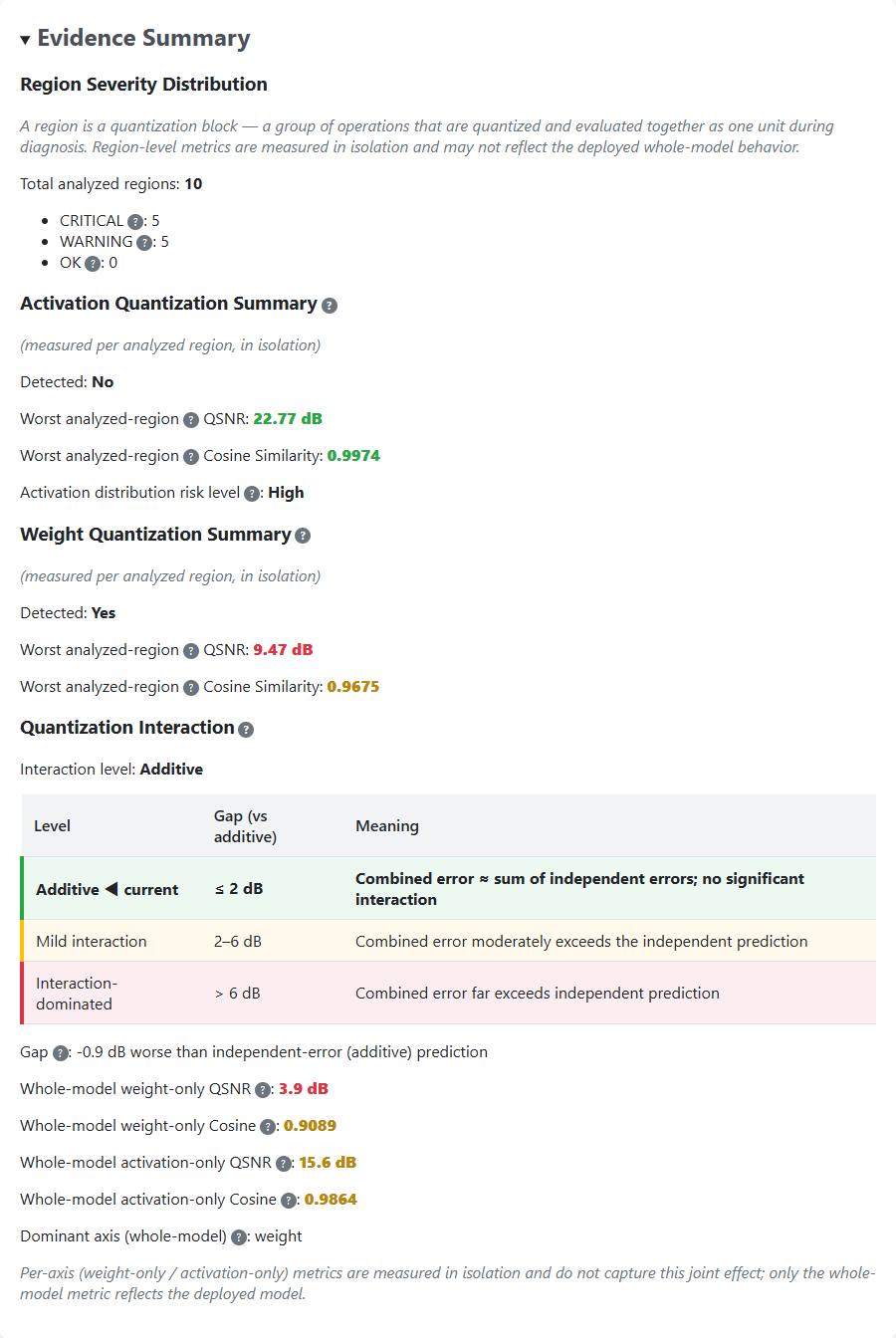
A region is a quantization block — a group of operations that are quantized and evaluated together as one unit during diagnosis. The report grades each region into a severity tier (OK / Warning / Critical) and reports region-level metrics (Cosine Similarity, QSNR) measured in isolation, which may not fully reflect deployed whole-model behavior.
The report contains three parts:
- Model Status — overall judgment (OK / Warning / Critical) with whole-model Cosine Similarity and QSNR.
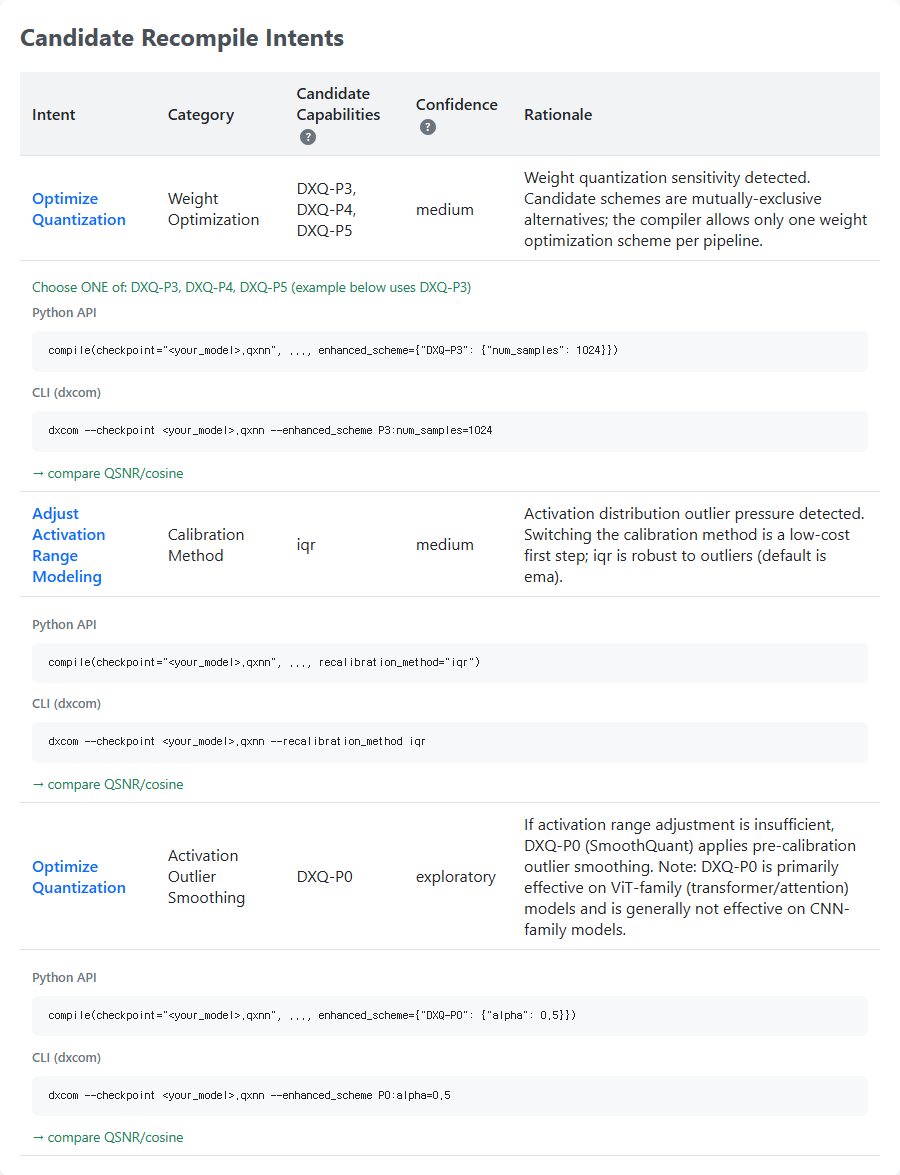
- Candidate Recompile Intents — suggested next steps (e.g., a DXQ-P* scheme or a different calibration method), each with ready-to-paste Python API and
dxcomCLI snippets. - Evidence Summary — region severity distribution and weight/activation quantization details.
Reading the Report
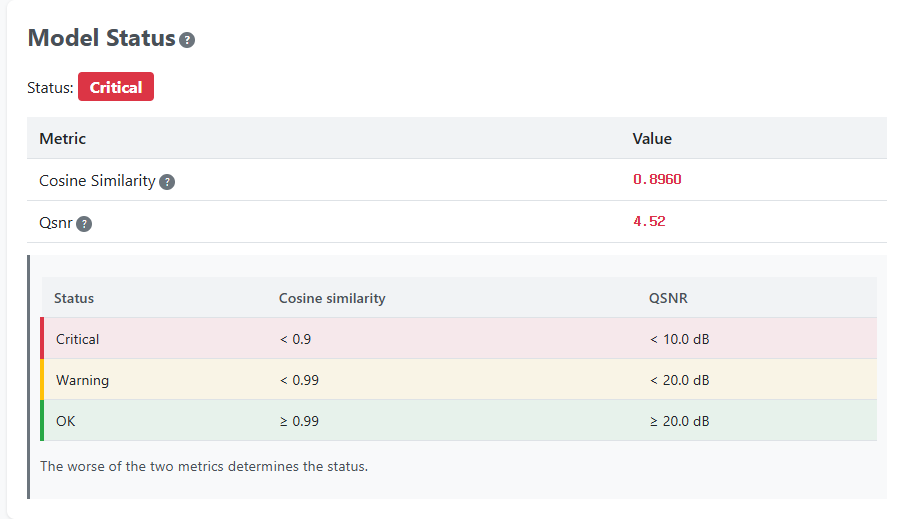
Model Status gives the at-a-glance verdict. The status badge (here, Critical) is derived from the worse of the whole-model Cosine Similarity and QSNR, graded against the thresholds shown below it.
Candidate Recompile Intents lists the recommended next steps in priority order. Each intent comes with ready-to-paste Python API and dxcom CLI snippets that target the .qxnn checkpoint, so you can apply the suggestion directly via QXNN Resume. The candidate capabilities (e.g., DXQ-P3/P4/P5) are mutually-exclusive alternatives — pick one.
Evidence Summary (collapsible) backs the recommendations with the per-region severity distribution and weight/activation quantization details that the diagnosis is based on.
Usage
dxcom Command
dxcom \
  -m large_model.onnx \
  -c config.json \
  -o output/large_model \
  --quant_diagnosis
dx_com Python Module
import dx_com

dx_com.compile(
    model="large_model.onnx",
    output_dir="output/large_model",
    config="config.json",
    quant_diagnosis=True,
)
Output Files
quant_diagnosis creates a quant_diagnosis/ subdirectory under output_dir:
| File | Description |
|---|---|
quant_diagnosis/{model}.qxnn | Resume checkpoint consumed by QXNN Resume |
quant_diagnosis/diagnosis_report.html | Per-region quantization quality report with retry snippets |
The .qxnn checkpoint is always written when diagnosis runs; the HTML report is written on diagnosis success.
QXNN Resume (Re-quantization Without Recompile)
QXNN Resume takes a .qxnn checkpoint and re-runs only the quantization-dependent stages (Quantization → Optimize → Codegen → SingleArtifact). The original ONNX model and config are not needed — the calibration settings are embedded in the checkpoint.
A .qxnn checkpoint is produced by quant_diagnosis (see above).
Selecting Resume Mode
QXNN resume mode is selected by passing a .qxnn checkpoint:
- CLI:
--checkpoint <path>.qxnn - Python:
checkpoint="<path>.qxnn"
The checkpoint file extension must be .qxnn (case-insensitive); any other extension raises ValueError.
Usage
Re-calibrate with a different observer:
dxcom \
  --checkpoint output/large_model/quant_diagnosis/large_model.qxnn \
  -o output/large_model_iqr \
  --recalibration_method iqr
Enable automatic Q-PRO on resume:
dxcom \
  --checkpoint output/large_model/quant_diagnosis/large_model.qxnn \
  -o output/large_model_qpro \
  --use_q_pro
dx_com Python Module:
import dx_com

dx_com.compile(
    checkpoint="output/large_model/quant_diagnosis/large_model.qxnn",
    output_dir="output/large_model_iqr",
    recalibration_method="iqr",   # or: use_q_pro=True
)
Resume-Only Options
The following arguments apply only in QXNN resume mode (i.e., together with --checkpoint). Using them in standard compile mode raises an error.
| CLI Option | Python Parameter | Description |
|---|---|---|
--checkpoint | checkpoint | Path to the .qxnn resume artifact. Selects resume mode. |
--recalibration_method | recalibration_method | Observer override for re-calibration. One of minmax, ema, iqr. |
--enhanced_scheme | enhanced_scheme | Manual Q-PRO scheme selection (e.g., P3:num_samples=1024). Mutually exclusive with --use_q_pro. |
--dataset_path | dataset_path | Override the calibration dataset path embedded in the checkpoint. |
--checkpointand-m/--model_pathare mutually exclusive.--output_dir(-o) is required for resume.--use_q_proand--enhanced_schemeare mutually exclusive.-c/--config_pathis not required — on resume the calibration DataLoader is auto-built from the config embedded in the.qxnn(default loader only). Use--dataset_pathto point at a different dataset.
Output Files
QXNN Resume writes the re-quantized model binary to output_dir:
{checkpoint_stem}.dxnn— re-quantized model binary (filename defaults to the checkpoint stem; override withoutput_name).
End-to-End Example
For a complete, step-by-step walkthrough of diagnosing a model and iterating on quantization settings, see the Use Case 6: Diagnose and Re-quantize Without Recompile section in Common Use Cases.
For the automatic Q-PRO quantization pipeline used during resume, see the Automatic Q-PRO (use_q_pro) section in Execution of DX-COM.